

academy
VOYCE Academy is a hands-on music academy in Siolim, Goa for DJs, producers and artists. Courses cover DJing, music production, Ableton Live, Logic Pro, mixing and mastering, synthesis and sampling, and live performance: modular, studio-based, and taught by working artists and engineers with real studio hours built in.
find your course
what do you want to do?
Twelve programmes, taught by working artists. Six run at two levels, which makes eighteen courses in all. Search, or pick what you want to do.
what do the levels mean?
- essential
- Open entry. You leave able to run the core workflow independently and deliver a coherent project or performance.
- signature
- After the Essential course, or a diagnostic that proves equivalent experience. You leave able to design a personal system, answer a brief, revise it, and deliver to a professional standard.
- signature specialist
- Six sessions on one advanced discipline. Entry is the relevant Essential course or equivalent fluency. You leave having applied it inside a finished, documented capstone.
- single tier
- Instrumental music production, turntablism and ComfyUI run as one open-entry course.
Not sure where you fit? and we will listen to your work.
production
The DAW as an instrument, the record as the outcome.
Taught on Live 12.4 Suite and the current supported Logic Pro release.
performance
Reading a room, and playing it.
rekordbox 7 and CDJ-class players, Traktor Pro 4, Serato DJ Pro with Stems and DVS, turntables and DVS control, Push and Move, professional booth practice.
projection
The visual half of a modern show.
Blender, Resolume and ComfyUI. Assumes no prior 3D or video experience.
12 programmes
view course
A complete first production pathway in Logic Pro: recording, MIDI, editing, arrangement, sound selection, signal flow and polished demo delivery.
who it is for
New producers, songwriters, instrumentalists and vocalists who want a structured Logic Pro workflow.
entry
No prior qualification. Basic computer fluency and active listening. Bring one reference track and one original idea by session two.
what you will be able to do
- Configure an organised project, audio and MIDI routing and a clean recording path.
- Record, comp and edit MIDI and audio without losing musical feel.
- Create drums, harmony and texture with stock instruments, Session Players and sampling tools.
- Build a full arrangement using markers, automation, buses and efficient project management.
- Produce a balanced demo mix and export collaboration, listening and archive files correctly.
- Explain when an assistive feature has been used, and retain final creative judgement.
what it runs on
- core platform
- Current supported Logic Pro release on Apple silicon; Core Audio interface; headphones and nearfield monitoring.
- native creation
- Session Players, Chord Track and Chord ID, Drum Machine Designer, Step Sequencer, Live Loops, Alchemy, Sampler and Quick Sampler.
- editing and delivery
- Smart Tempo, Flex Time, Flex Pitch, comping, automation, Stem Splitter and Mastering Assistant, guided tools, not substitutes for listening.
- studio utilities
- External storage, session template, naming and version convention, reference tracks, loudness and true-peak metering.
capstone
A two to four minute original track delivered as an editable project, stereo master, consolidated stems and a process note.
- sessions
- 12
- contact hours
- 24
- weeks
- 6
- studio hours
- 5 tracked
the twelve sessions
- 01discoverstudio systemSample rate, I/O, buffers, project alternatives, folders and naming. Trace a microphone to the monitor. Template and signal-flow diagram.
- 02discovermidi and timingRecord MIDI, quantise selectively, edit velocity and note length; metronome, cycle and groove. Eight-bar humanised sketch.
- 03experimentaudio recordingSet levels, create cue mixes, record takes, use take folders and comp a clean performance. Comped performance with edit notes.
- 04experimentmusical editingSmart Tempo, Flex Time and Flex Pitch; clean edits with fades that preserve phrasing. Before and after edit with a rationale.
- 05experimentrhythm designBuild drums with Drum Machine Designer, Step Sequencer and Session Players; groove and dynamics. Sixteen-bar arrangement.
- 06experimentharmony and playersChords, bass and supporting parts with Chord Track, Chord ID and Session Players; replace weak suggestions by hand. Harmonic bed.
- 07buildinstruments,samplingA focused palette in Alchemy, Sampler and Quick Sampler; edit envelopes, filters and modulation. Three substantially edited sounds.
- 08buildarrangementLoop to song using markers, contrast, transitions, automation and arrangement passes. Arrangement with section markers.
- 09buildmix foundationsSet gain, pan, EQ, compression, groups and buses; check mono and headroom. Static mix plus issue list.
- 10refinespace and movementSends, delay, reverb, saturation and automation to create depth without masking. Depth-and-movement revision.
- 11refinerepair,remix, reviewEvaluate Stem Splitter, replacement and remix options; compare manual against assisted decisions. Near-final mix and decision log.
- 12presentfinal deliveryQuality control, Mastering Assistant as comparison, print approved exports, archive and present. Final track, stems, review.
Five tracked studio hours are allocated across the course.
An advanced Logic Pro pathway for producers who need faster systems, deeper MIDI and sound design, confident vocal production, immersive options and release-ready delivery.
who it is for
Working producers, engineers and composers, and graduates of Logic Pro Essential or equivalent experience.
entry
Logic Pro Essential, or a diagnostic project demonstrating recording, editing, routing, automation and a complete arrangement.
what you will be able to do
- Design repeatable templates, routing systems and revision-safe project structures.
- Produce detailed MIDI, expressive instruments and hybrid hardware and software sessions.
- Direct and edit vocal productions from tracking through comp, tuning, stack and effects.
- Use Alchemy, Sampler, modulation and resampling to build a recognisable sonic identity.
- Mix with advanced phase, dynamics, spatial and immersive-audio awareness.
- Deliver release, stem, sync, immersive or collaboration packages to a defined brief.
what it runs on
- core platform
- Current supported Logic Pro release; Apple silicon workstation; low-latency interface; control surface or MIDI controller; calibrated monitoring.
- native advanced
- Alchemy, Sampler, Sculpture where available, Smart Controls, Scripter and MIDI FX, Live Loops, Step Sequencer, Session Players, Chord ID, Stem Splitter.
- vocal and repair
- Flex Pitch and Flex Time, take comping and native processing; Melodyne and iZotope RX as optional comparison and repair workflows.
- mix and delivery
- Spatial Audio and Dolby Atmos tools, Mastering Assistant, current FabFilter and iZotope processors, metering and reference management.
capstone
A release-ready production with editable project, stems, alternate versions, delivery matrix and a documented revision trail.
- sessions
- 12
- contact hours
- 24
- weeks
- 6
- studio hours
- 5 tracked
the twelve sessions
- 01diagnoseprofessional systemAudit an existing project; rebuild templates, track stacks, routing, patch recall, versioning and backup. Template and workflow audit.
- 02designadvanced midiArticulation, MIDI FX, Smart Controls, controller mapping and expressive data to create playable parts. Instrument performance and map.
- 03designvocal productionPlan a session, comp, tune, time, clean, layer and direct stacks while preserving the artist's identity. Lead and supporting vocal.
- 04designsignature soundLayered Alchemy and Sampler patches, modulation systems and resampled textures tied to a brief. Five-patch signature palette.
- 05producedrums and low endDesign transients, phase-align layers, manage the kick and bass relationship, vary without clutter. Rhythm and low-end pass.
- 06producehybrid recordingIntegrate microphones, instruments, external MIDI and audio hardware, and latency compensation. Hybrid session with recall sheet.
- 07producearrangement detailMicro-dynamics, counterpoint, transitions, automation and alternate structures for release and sync. Main plus alternate cut.
- 08refineadvanced mixResolve phase, spectral balance, dynamics, saturation, parallel paths and automation against references. Mix v1 and revision plan.
- 09refineimmersive and spatialBinaural monitoring, object and bed decisions, and Atmos delivery constraints where the room supports it. Short immersive study.
- 10refinereconstructionStem Splitter and repair tools for restoration, remix and replacement; disclose limitations and artefacts. Section with A/B evidence.
- 11delivermaster and formatsCompare manual mastering decisions with Mastering Assistant and Ozone; prepare clean and alternate files. Delivery matrix.
- 12deliverclient simulationRun a revision round, final quality control, archive, handoff and presentation against the brief. Release-ready package.
Five tracked studio hours are allocated across the course.
view course
A practical foundation in Ableton Live's Session and Arrangement workflows, MIDI, recording, warping, sound design, sampling, mixing and finished-track delivery.
who it is for
New producers, beatmakers, electronic musicians and creators moving from loops to complete arrangements.
entry
No prior qualification. Reliable computer and file-management skills. Bring two reference tracks to the first session.
what you will be able to do
- Navigate Session and Arrangement View and choose the right workspace for the task.
- Record, warp, edit and resample audio with timing and tonal intent.
- Program drums and musical parts using MIDI tools, groove, racks and stock instruments.
- Create original sounds with Drift, Wavetable, Simpler and Sampler, and audio effects.
- Develop a loop into a complete, automated arrangement and a balanced mix.
- Prepare correct exports, stems and a portable, collected project archive.
what it runs on
- core platform
- Ableton Live 12.4 Suite or the current Academy-supported Live 12 release; audio interface; MIDI controller; headphones and monitors.
- native creation
- Session and Arrangement View, MIDI Tools, tuning systems, Drum Rack, Simpler, Sampler, Drift, Wavetable, Meld, Operator, Granulator III and Roar.
- transformation
- Warping, comping, Groove Pool, resampling, Bounce to Audio and Suite Stem Separation, always with a manual quality check.
- workflow
- Collections, templates, Pack management, project collect-and-save, reference tracks and versioned exports.
capstone
A two to four minute production delivered as a collected project, stereo master, stems and a concise workflow note.
- sessions
- 12
- contact hours
- 24
- weeks
- 6
- studio hours
- 5 tracked
the twelve sessions
- 01discoverlive workflowSet audio and MIDI preferences; compare Session and Arrangement View; establish file, tempo and naming conventions. Template and sketch.
- 02discoveraudio and warpRecord audio, choose warp modes, set markers, crop, fade and preserve groove. Warped audio study at two tempos.
- 03experimentmidi and grooveRecord and edit MIDI, use Scale, Transform and Generate tools, velocity, chance and the Groove Pool. Sixteen-bar MIDI groove.
- 04experimentdrum systemsBuild Drum Racks, choke groups, chains, macros and variation; layer only when phase and purpose are clear. Rack and pattern set.
- 05experimentsynthesisShape patches in Drift and Wavetable; compare oscillator, filter, envelope and modulation choices. Three playable patches in context.
- 06experimentsamplingSimpler and Sampler, slicing, multisampling, resampling and basic Granulator III technique. Instrument from recorded material.
- 07buildtransformationComp audio, Bounce to Audio, separate or reconstruct stems where justified, and listen for artefacts. Edited section and notes.
- 08buildarrangementCapture Session ideas into Arrangement; use locator structure, contrast, transitions and automation. Complete first arrangement.
- 09buildracks and movementCreate Instrument and Audio Effect Racks, macros, modulation and controlled randomisation. Rack with mapped macros.
- 10refinemix and routingSet gain, groups, returns, EQ, dynamics, space and mono compatibility. Static mix and revised routing.
- 11refineperformance captureLaunch scenes, record a performance pass, edit the result, compare programmed against performed form. Near-final pass.
- 12presentexport and archiveQuality control, export stereo and stems, collect-and-save, document dependencies and present. Final track and archive.
Five tracked studio hours are allocated across the course.
An advanced Ableton pathway built on expressive sound design, Max for Live, stem and resampling workflows, MPE and tuning, generative systems, Push and Move integration, and the crossover between production and performance.
who it is for
Producers and performers who already finish tracks in Live and want deeper, faster and more personal systems.
entry
Ableton Live Essential, or a diagnostic Live Set showing audio and MIDI editing, routing, automation, arrangement and export competence.
what you will be able to do
- Build modular but legible Live systems using racks, modulation and Max for Live.
- Create expressive instruments with Meld, Operator, Wavetable, MPE and alternate tuning.
- Use separation, resampling, granular and Bounce to Audio workflows critically.
- Design generative processes while retaining editability and intentional form.
- Integrate Push 3, Move or an equivalent controller into a low-friction workflow.
- Deliver a distinctive production and a reliable performance-ready version of it.
what it runs on
- core platform
- Ableton Live 12.4 Suite or the current supported release with Max for Live; low-latency interface; calibrated monitoring.
- sound systems
- Meld, Operator, Wavetable, Drift, Roar, Granulator III, Sampler, racks, modulators, MPE, tuning systems and Expressive Chords where licensed.
- transformation
- Suite Stem Separation, Bounce to Audio, resampling, comping, spectral and time tools, and reference comparison.
- control and extension
- Push 3, Ableton Move or an equivalent grid controller; Max for Live devices; optional external and CV-capable instruments.
capstone
A finished production plus a performance-ready derivative Live Set, with rack and device documentation, collected project, stems and revision history.
- sessions
- 12
- contact hours
- 24
- weeks
- 6
- studio hours
- 5 tracked
the twelve sessions
- 01diagnosesystem designAudit CPU, latency, routing, naming, templates, defaults, Packs and controller mappings in a real project. Optimised template.
- 02designseparation and remixStem separation, warping and reconstruction; identify bleed and artefacts, choose manual alternatives. Remix with decision log.
- 03designadvanced synthesisCompare Meld, Operator and Wavetable architectures; build modulation with performance intent. Five-patch instrument rack.
- 04designmpe and tuningEdit MPE, map expressive controllers, explore tuning systems and use Expressive Chords critically. Expressive tuned study.
- 05producemax for liveModulation, sequencing and analysis devices; inspect signal flow and avoid opaque device chains. Documented device chain.
- 06producegenerative compositionCombine chance, probability, Follow Actions and MIDI Generate and Transform; curate and print results. Edited arrangement.
- 07produceresampling,granularCreate source material, Bounce to Audio, resample and transform with Granulator III and spectral tools. Texture library.
- 08produceperformance racksBuild macro systems, snapshots and variations, and safe ranges for expressive manipulation. Rack playable without a screen.
- 09refinepush and moveCapture, edit and transfer material with Push 3 or Move; compare standalone, controller and desktop decisions. Controller pass.
- 10refinelatency and hardwareManage external instruments, compensation, phase, gain, returns, CPU and live- safe freezing. Stable hybrid mix and recall.
- 11deliverproduction to stageTranslate the track into stems and scenes, rehearse transitions, preserve an editable studio master. Derivative live set.
- 12deliversignature presentationFull playback and performance, collect-and-save, delivery formats, and defend key system choices. Signature package.
Five tracked studio hours are allocated across the course.
production
instrumental music production
Produce your own records with played parts: composing, recording, arrangement and mixing.
- single tier₹55,00012 sessions · 24 hours · 6 wks
view course
The production stream's core course for played parts: composing, recording, arrangement, musical structure, mixing and release-ready output.
who it is for
Instrumentalists and vocalists who want to produce their own records, songwriters moving from demo to release, and producers who work with live players.
entry
Open entry, single tier.
what you learn
- Composing
- Recording
- Arrangement
- Musical structure
- Mixing
- Release-ready output
what it runs on
- platform
- Taught on the cohort's DAW standard.
- sessions
- 12
- contact hours
- 24
- weeks
- 6
- studio hours
- 5 tracked
The full session plan is sent on request from academy@voyce.world.
view course
A concentrated sound-design course covering synthesis fundamentals, modulation, wavetable, FM and spectral methods, sampling, multisampling, granular work, resynthesis, patch documentation and the creation of a personal sonic identity.
who it is for
Producers and composers who can operate a DAW and want to design sounds rather than only browse them.
entry
Ableton Live Essential, Logic Pro Essential or equivalent DAW fluency. Bring a portable or phone recorder and a cleared personal sample set.
what you will be able to do
- Predict and control oscillator, filter, envelope, modulation and signal-flow behaviour.
- Create musical patches across subtractive, wavetable, FM, granular and spectral approaches.
- Record, edit, map and package original samples as playable instruments.
- Use advanced commercial synths without depending on presets or a single interface.
- Track sample origin, permission, processing and attribution where required.
- Deliver a coherent sound bank and short musical demonstration with useful documentation.
what it runs on
- daw-native
- Ableton Wavetable, Operator, Meld, Drift, Sampler, Simpler and Granulator III; Logic Alchemy, Sampler and Quick Sampler as relevant.
- advanced instruments
- Xfer Serum 2, Arturia Pigments 7, Kilohearts Phase Plant and Native Instruments Kontakt 8 on Academy-licensed stations.
- capture and edit
- Portable or phone recorder, microphone and interface, waveform editor, tuning and analyser, metadata editor and batch export utilities.
- optional hardware
- Subtractive, wavetable, FM or modular hardware where available, with safe level, clock and recall documentation.
capstone
A documented bank of twelve to twenty original patches or samples, or one deeply sampled instrument, plus a sixty to ninety second musical demo and a provenance sheet.
- sessions
- 6
- contact hours
- 12
- weeks
- 3
- studio hours
- 5 tracked
the six sessions
- 01hearsubtractive foundationsTrace oscillator, mixer, filter, amplifier and envelopes; match a reference timbre by ear across two instruments. Three patches and maps.
- 02buildwavetable,modulationScan tables, route LFOs and envelopes, use macros and performance modulation in Serum 2, Pigments 7 or native equivalents. Four patches.
- 03buildfm,spectral,modularCompare Operator, Meld and Phase Plant-style routing; manage ratios, sidebands, feedback and modular clarity. Three complex patches.
- 04transformsamplingRecord, trim, de-noise, tune, loop, slice and multisample; build instruments in Sampler or Kontakt 8. Mapped instrument with metadata.
- 05transformgranular, resynthesisTextures with Granulator III, Alchemy, Serum 2 or Pigments; document source rights and audible transformation. Texture kit and sheet.
- 06presentsound libraryNormalise naming, macros, gain, tags, presets and demos; run a blind usability test and revise. Sound bank plus a short musical demo.
Five tracked studio hours are allocated across the course.
view course
A critical-listening and delivery course in session preparation, balance, EQ, dynamics, depth, stereo, saturation, mix-bus decisions, loudness, translation and quality control. Assistive processors are taught as transparent second opinions.
who it is for
Producers and engineers with complete arrangements who want repeatable mix and mastering decisions.
entry
Ableton Live Essential, Logic Pro Essential or equivalent. Bring one organised multitrack project and at least two reference records.
what you will be able to do
- Prepare a mix session with clean routing, gain structure, phase awareness and monitoring.
- Use EQ, dynamics, transient and saturation tools to solve defined musical problems.
- Create depth, width and movement while preserving mono compatibility and translation.
- Use references, meters and assistive processors without surrendering judgement.
- Master to a brief using loudness, true peak, dynamics and format-aware quality control.
- Deliver mix, instrumental, clean, stem, pre-master and master packages with revision notes.
what it runs on
- core
- Current Logic Pro or Ableton Live stock EQ, dynamics, saturation, delay, reverb, utility and metering; a calibrated room or headphones where possible.
- precision options
- FabFilter Pro-Q 4, Pro-C 3 and Pro-L 2; phase, clip and metering tools; iZotope RX 11 for repair where licensed. assistive comparison iZotope Neutron 5 and Ozone 12; sonible smart:EQ 4 and smart:comp 3. Every suggestion must be level-matched, explained and editable.
- translation
- Reference-management tool, SoundID Reference where available, true-peak and loudness metering, mono and small-speaker checks, consumer playback.
capstone
One complete mix and master package, final mix, instrumental or alternate, pre-master, mastered formats, stems if briefed, reference log and revision note.
- sessions
- 6
- contact hours
- 12
- weeks
- 3
- studio hours
- 5 tracked
the six sessions
- 01diagnosesession,monitoringOrganise, route, gain-stage, check polarity and phase, establish known monitoring, define references and the brief. Issue hierarchy.
- 02balanceeq and phaseBuild a static balance, remove masking, use dynamic and spectral EQ only for audible reasons, check phase and mono. Annotated A/Bs.
- 03shapedynamics, transientsCompression, expansion, gating, transient control, clipping and automation; preserve groove and envelope. Level-matched comparisons.
- 04shapedepth and colourFront-to-back with delay, reverb, saturation, stereo tools and automation; test mono and translation. Near-final mix and log.
- 05translatemix bus and masterCompare mix-bus paths, pre-master headroom, limiting, loudness and true peak across target formats. Two justified masters.
- 06deliverquality controlClicks, tails, metadata, start and end, phase, loudness and file-format checks; a revision and delivery simulation. Final package.
Five tracked studio hours are allocated across the course.
view course
A human-led system for model-assisted ideation, generation, editing, vocals, separation, arrangement, mixing and documentation. The artist writes the brief, curates the material, transforms it in a DAW, and can explain provenance and rights. Replaces AI Music.
who it is for
Producers, songwriters, sound designers and creative directors who already operate a DAW and want advanced, responsible model-assisted workflows.
entry
Ableton Live Essential, Logic Pro Essential or equivalent. Tool accounts and paid tiers are confirmed per cohort and are not assumed.
what you will be able to do
- Write a human creative brief and choose a tool for a defined role rather than for novelty.
- Generate, compare and curate material using structured prompt and reference tests.
- Convert outputs into editable stems, audio and MIDI, then substantially produce them.
- Use synthetic or transformed vocals only with explicit consent, licence and safeguards.
- Hear artefacts, model bias, sameness, over-reliance and the flatness of one-click finishing.
- Deliver original work with a complete source, transformation, rights and disclosure record.
what it runs on
- generation
- Current licensed generative platforms, subject to access, territory, terms and export rights at the date of use. Model version is logged at generation.
- voice and instruments
- Vocal production from MIDI and lyrics, and AI instruments, used only with a documented voice and rights permission.
- extraction and editing
- Note-level stem and MIDI reconstruction, current DAW stem separation, audio-to-MIDI, manual transcription, comping. Every result checked for artefacts.
- production and finishing
- Logic Pro or Ableton Live as the system of record. Assistive mixing and mastering as level-matched suggestions, never automatic approval.
capstone
A two to four minute original hybrid production with editable project, final audio, stems, prompt and reference tests, a source and transformation manifest, a rights and consent record, and a five-minute authorship defence.
- sessions
- 6
- contact hours
- 12
- weeks
- 3
- studio hours
- 5 tracked
the six sessions
- 01framehuman directionDefine authorship, brief, references, prohibited uses, tool roles, budget, privacy and consent. Run a baseline with no AI. Creative constitution.
- 02explorecomposition modelsRun a controlled prompt and reference matrix across current tools; compare form, musicality, lyrics, stems and editability. Curated source set.
- 03explorevoice and performanceDirect approved voice tools from MIDI and lyrics; document consent, identity boundaries and human edits. Study and permission record.
- 04curateextract,reconstructSeparate stems, convert audio to MIDI where useful, clean artefacts, re- harmonise, re-record and rebuild in the DAW. Editable reconstruction.
- 05integrateproduce and finishTransform arrangement, sound design and mix; compare assistive suggestions with manual choices; reject rights-unclear material. Decision log.
- 06declarerelease simulationQuality control, source and transformation manifest, licences, disclosures, release artwork and metadata. Work and provenance dossier.
Five tracked studio hours are allocated across the course.
Everything in HI Essentials, then six sessions that turn a practice into a business, building your own tools, a sonic signature that cannot be prompted by someone else, the release pipeline, money, placement, and a campaign that survives being stress-tested.
who it is for
Artists who already finish work and want the system around it, tools, pipeline, rights, money and reach, rather than one more generator.
entry
HI Essentials, or equivalent evidence of a working model-assisted practice with documented provenance.
what you will be able to do
- Have a model write the tool you would never have written yourself, and know when to.
- Build a sonic signature that is identifiably yours and cannot be prompted by another.
- Run a release from finished master to delivery without touching a spreadsheet.
- Price work, model revenue, and read a deal knowing which three clauses actually matter.
- Write to brief for sync and place work where independent artists are actually paid.
- Build and defend a full campaign, and evaluate a new tool in under an hour.
what it runs on
- generation and voice
- As HI Essentials, extended to local models for work that should not leave the machine, and to training on the artist's own material with consent.
- building
- Max for Live and Scripter written with model assistance; Python for batch stems, delivery packaging and programmatic MIDI. No prior code required.
- pipeline
- Metadata and disclosure fields, artwork resizing, distribution preparation, analytics exports and audience data, connected end to end.
- business
- Revenue and royalty models, sync and library metadata, rider and deal documents. Orientation for working artists, never legal advice.
capstone
A complete release campaign and the automated system that runs it, the Essentials provenance dossier, plus the tools built, the pipeline documented and the campaign defended.
- sessions
- 12
- contact hours
- 24
- weeks
- 6
- studio hours
- 5 tracked
sessions seven to twelve
Contains Hybrid Intelligence Essential in full; the six sessions below follow it.
- 07buildyour own toolsHave a model write the Max for Live device or the script you would never have written. Batch stems, packaging, programmatic MIDI. One working tool.
- 08buildsignature and consentVoice conversion and training on your own material; where the consent line sits and why it is commercial as well as ethical. Signature study.
- 09connectthe pipelineFinished master to delivered release without a spreadsheet: stem delivery, metadata, artwork, distribution prep. Admin hours, before and after.
- 10trademoneyPricing, royalty and revenue modelling, break-even per release, and reading a deal for the three clauses that matter. Costed release model.
- 11placesync and placementWriting to brief, cue sheets, and the metadata that makes you findable in a library. Research what a supervisor has placed. Pitch pack.
- 12defendcampaign and reviewA campaign stress-tested, including the pass that finds where the machine made you sound like everyone else. Campaign and authorship defence.
view course
Manual timing, library discipline, phrasing, transitions, programming, crowd awareness and professional booth habits, built across current club and software ecosystems. The verified twelve-session offer, as the Essential pathway.
who it is for
New DJs and self-taught selectors who want repeatable fundamentals and a coherent first public-ready set.
entry
No prior qualification. Students supply a legal music library of at least forty suitable tracks by session three.
what you will be able to do
- Prepare and maintain a reliable library with accurate grids, cues and metadata.
- Beatmatch, phrase and transition manually using gain, EQ, filters, loops and effects.
- Program a set with musical direction, energy control and audience awareness.
- Move safely between controller, USB and CDJ, and current cloud-aware workflows.
- Operate a professional booth with correct levels, monitoring, changeover and etiquette.
- Record, review and improve a complete set using evidence rather than instinct alone.
what it runs on
- core ecosystem
- rekordbox 7 on an Academy-supported release; local music files and performance-ready USB media; headphones and monitors.
- hardware
- Controller and club workflow on current CDJ and XDJ-class players, including CDJ-3000X or CDJ- 1500X where available, and a DJM-A9-class four-channel mixer.
- cross-platform
- Serato DJ Pro and Traktor Pro 4 for comparison, portability and future pathway decisions.
- reliability
- A second USB or offline backup, approved cables and adaptors, ear protection, a record path and a written changeover plan. Streaming is never the only copy.
capstone
A thirty to forty-five minute recorded set with exported library and USB, set map, contingency plan and a short performance reflection.
- sessions
- 12
- contact hours
- 18
- weeks
- 6
- studio hours
- 5 tracked
the twelve sessions
- 01preparebooth and signalIdentify player, mixer, cue, booth, master and record paths; set gain safely; practise changeover etiquette. Signal and hearing check.
- 02preparelibraryImport, analyse and tag; correct grids, phrases, keys and metadata; plan legal backup media. Organised twenty-track practice crate.
- 03practisemanual beatmatchingMatch tempo and phase by ear; use pitch control and jog correction before verifying with sync. Three clean manual blends.
- 04practisephrasing and cueingCount bars, mark structure, set memory and hot cues, enter and exit on musically useful phrases. Phrase map and four points.
- 05practisegain and eqTrim, channel faders, crossfader options, EQ and filters while holding consistent loudness. Ten-minute level-controlled mix.
- 06practiseloops and effectsLoops, beat jump and restrained effects to extend or recover a section without losing phrasing. Five purposeful transitions.
- 07programharmonic movementUse key as one input, not a rule; move between energy, tempo and genre with intent. Three mini-routes through one crate.
- 08programset architectureDesign opening, development, peak and landing; choose tracks for role, not popularity alone. Thirty-track set map.
- 09programaudience awarenessRead room signals, make controlled substitutions and preserve identity under changing conditions. Adaptive alternate path.
- 10rehearsepro workflowPrepare and export USBs, use current CDJ search, preview and cue features, practise a clean handover. Primary and backup media.
- 11rehearsefailure drillsRecover from a bad grid, missed cue, source failure, level jump and wrong track without panic. Troubleshooting checklist.
- 12presentshowcase setPerform, record and review a coherent set; submit cue notes and a post-set reflection. Recorded thirty to forty-five minute set.
Five tracked studio hours are allocated across the course.
An advanced DJ pathway extending the Essential course into multi-deck programming, stems and live remix, DVS, advanced booth systems, long-form narrative, rider preparation and failure-proof performance.
who it is for
Working DJs, Essential graduates and performers preparing for clubs, festivals, touring or hybrid sets.
entry
Art of DJing Essential, or a diagnostic thirty-minute set showing manual timing, phrasing, library preparation, clean levels and recovery.
what you will be able to do
- Execute long-form, multi-deck and harmonic programming without losing narrative clarity.
- Use stems, DVS, loops, effects and live remix as musical choices, not demonstrations.
- Prepare professional rekordbox, Serato DJ Pro and Traktor Pro 4 workflows to a brief.
- Write a technical rider, an input and changeover plan and a redundant media strategy.
- Adapt to room, slot and equipment while protecting sound quality and artistic identity.
- Deliver and critically review a forty-five to sixty minute Signature performance.
what it runs on
- club system
- Current CDJ-3000X or CDJ-class players, a DJM-A9 or V10-class mixer, rekordbox 7 library and redundant local USB media.
- performance software
- Serato DJ Pro with Stems and DVS where licensed; Traktor Pro 4 with stem separation and Pattern Player; rekordbox performance mode as required.
- control
- Optional turntables and DVS, pad controller, RMX-style performance effects or MIDI control, only where the routing and recovery path are understood.
- professional kit
- Calibrated headphones, ear protection, approved cables and adaptors, recorder, labelled backups, technical rider and changeover sheet.
capstone
A forty-five to sixty minute recorded Signature set with exported media, rider, changeover plan, contingency matrix and reflection.
- sessions
- 12
- contact hours
- 18
- weeks
- 6
- studio hours
- 5 tracked
the twelve sessions
- 01diagnoseprofessional boothAudit timing, gain, library and recovery; configure four-channel routing, recording, sends and changeover. Diagnostic set and audit.
- 02designharmonic narrativeUse key, tension, rhythm and timbre to plan long arcs; build multiple routes for slot and room. Three narrative set routes.
- 03expandthree and four decksLayer percussion, acapella, texture and full tracks while preserving phase, headroom and focus. Fifteen-minute study.
- 04expandstems and remixCompare stem quality and latency across supported platforms; isolate, replace and recombine with restraint. Three routines.
- 05expanddvs and turntablesConfigure timecode, calibration, cue modes and recovery; expressive control without fragile complexity. Stable DVS routine.
- 06expandloops and rhythmRepeatable routines with loops, beat jump, Pattern Player and RMX-style effects, and channel discipline. Two original routines.
- 07designhybrid controlMap pads or MIDI, or connect a remix deck; establish safe ranges, latency checks and a bypass path. Performance module.
- 08designaudience adaptationWarm-up, support, peak and closing choices; make substitutions while protecting the narrative. Four response plans.
- 09rehearselong-form programmingConstruct a sixty-minute arc with planned flexibility, crate depth and energy reset points. Set map and reserve crates.
- 10rehearserider and failureWrite the rider and input list; drill corrupt media, network loss, deck faults and monitoring failure. Contingency matrix.
- 11rehearsefull runPerform the complete set under timed changeover and record detailed technical and creative notes. Rehearsal and revisions.
- 12presentsignature showcaseDeliver the set, complete post-show handoff, evaluate musical, technical and audience-facing decisions. Showcase and pack.
Five tracked studio hours are allocated across the course.
performance
turntablism
Turntables into instruments: scratching, beat juggling, cue control and rhythmic expression.
- single tier₹89,00012 sessions · 24 hours · 6 wks
view course
Turntables into instruments: scratching, beat juggling, cue control and rhythmic expression, with the culture and discipline behind them.
who it is for
DJs who want the turntable as an instrument, producers building routines into a live set, and anyone with a sense of rhythm and the patience to drill it.
entry
Open entry, single tier.
what you learn
- Scratching
- Beat juggling
- Cue control
- Rhythmic expression
- Turntables and DVS control
- The culture and discipline behind them
what it runs on
- platform
- Runs on turntables and DVS control alongside the Academy's CDJ-class players.
- sessions
- 12
- contact hours
- 24
- weeks
- 6
- studio hours
- 5 tracked
The full session plan is sent on request from academy@voyce.world.
view course
A focused specialist pathway in stem preparation, Session View architecture, controllers, clip launching, live looping, tempo following, redundancy and expressive real-time adaptation.
who it is for
Producers, electronic musicians, vocalists and instrumentalists translating finished material to the stage.
entry
Ableton Live Essential or equivalent. Bring at least two finished or near-finished pieces, with permission to perform all material.
what you will be able to do
- Convert studio arrangements into clear, CPU-aware performance stems and scenes.
- Map Push, Move or another controller for tactile control and safe improvisation.
- Launch clips, improvise structure, loop and process live inputs with musical timing.
- Use BeatSeeker or tempo-following only after a stable manual tempo plan exists.
- Design redundancy, latency, gain, monitoring and emergency recovery into the set.
- Perform a coherent twenty to thirty minute live set and document its technical needs.
what it runs on
- core platform
- Ableton Live 12.4 Suite or the current supported release; Session View; Max for Live; Performance Pack.
- control
- Push 3, Ableton Move, a Launchpad or APC-style grid, expression or foot controller as appropriate, minimal mappings, clearly labelled.
- live systems
- BeatSeeker, Follow Actions, clip envelopes, racks, looper and live-input chains, MIDI mapping, External Instrument and safe monitor routing.
- reliability
- Low-latency interface, DI and line isolation as required, independent backup playback, a power and cable plan, ear protection, set list and rider.
capstone
A twenty to thirty minute live performance with collected set, stem manifest, controller map, rider, redundancy plan and recordings.
- sessions
- 6
- contact hours
- 12
- weeks
- 3
- studio hours
- 5 tracked
the six sessions
- 01prepareset architectureSelect material, print stems, set tempo and warp strategy, scenes, locators, routing and a CPU budget. Skeleton and stem manifest.
- 02mapcontrollersCreate tactile mappings, macro ranges, visual labels and navigation; compare Push 3, Move and grid workflows. Screen-light map.
- 03performclips and formScene and clip launching, Follow Actions and clip envelopes; improvise form without disorienting the audience. Structured improvisation.
- 04performlive input and tempoBuild vocal and instrument looping and processing; test tempo-following against a manual fallback. Routine with bypass plan.
- 05stress-testreliabilityMeasure latency, gain and CPU; rehearse cable, controller, clip, clock and computer failures; write the run of show. Rider and recovery map.
- 06presentlive setPerform, record multitrack and stereo where practical, complete changeover, review expressive against technical choices. Performance package.
Five tracked studio hours are allocated across the course.
projection · 2 levels
blender
3D and motion for stage and release. No prior 3D experience assumed.
- essential · basic₹59,0008 sessions · 16 hours · 4 wks
- signature · advanced₹89,00012 sessions · 24 hours · 6 wks
view course
3D and motion for stage and release. Assumes no prior 3D or video experience.
who it is for
Artists and visual makers starting in 3D for club and festival visuals, stage and LED production, installations and digital media.
entry
Open entry. No prior 3D or video experience assumed.
what you learn
- 3D design
- Generative visuals
- Synchronised visuals
- Visual identity
- Workflow intelligence
what it runs on
- platform
- Blender, on a laptop that can run it; specifications are confirmed before enrolment.
where it goes
Club and festival visuals, Stage and LED production, Installations, Immersive environments, Digital media, VJ portfolio work.
- sessions
- 8
- contact hours
- 16
- weeks
- 4
- studio hours
- 5 tracked
The full session plan is sent on request from academy@voyce.world.
The deeper Blender pathway: 3D and motion for stage and release, built on the Essential foundation.
who it is for
Blender Essential graduates, and 3D artists who already work fluently in Blender.
entry
Blender Essential or equivalent fluency.
what you learn
- 3D design
- Generative visuals
- Synchronised visuals
- Visual identity
- Workflow intelligence
what it runs on
- platform
- Blender, on a laptop that can run it; specifications are confirmed before enrolment.
where it goes
Club and festival visuals, Stage and LED production, Installations, Immersive environments, Digital media, VJ portfolio work.
- sessions
- 12
- contact hours
- 24
- weeks
- 6
- studio hours
- 5 tracked
The full session plan is sent on request from academy@voyce.world.
projection · 2 levels
resolume
Real-time show visuals and projection mapping. No prior video experience assumed.
- essential · basic₹59,0008 sessions · 16 hours · 4 wks
- signature · advanced₹89,00012 sessions · 24 hours · 6 wks
view course
Real-time show visuals. Assumes no prior 3D or video experience.
who it is for
VJs, DJs and visual artists starting with live show visuals and projection.
entry
Open entry. No prior 3D or video experience assumed.
what you learn
- Live systems
- Projection mapping
- Synchronised visuals
- Generative visuals
- Workflow intelligence
what it runs on
- platform
- Resolume, on a laptop that can run it; specifications are confirmed before enrolment.
where it goes
Club and festival visuals, Projection mapping, Stage and LED production, Synchronised visuals for live acts.
- sessions
- 8
- contact hours
- 16
- weeks
- 4
- studio hours
- 5 tracked
The full session plan is sent on request from academy@voyce.world.
The deeper Resolume pathway: real-time show visuals and mapping, built on the Essential foundation.
who it is for
Resolume Essential graduates, and VJs who already run Resolume live.
entry
Resolume Essential or equivalent fluency.
what you learn
- Live systems
- Projection mapping
- Synchronised visuals
- Generative visuals
- Workflow intelligence
what it runs on
- platform
- Resolume, on a laptop that can run it; specifications are confirmed before enrolment.
where it goes
Club and festival visuals, Projection mapping, Stage and LED production, Synchronised visuals for live acts.
- sessions
- 12
- contact hours
- 24
- weeks
- 6
- studio hours
- 5 tracked
The full session plan is sent on request from academy@voyce.world.
projection
ComfyUI
Generative image workflows for stage and release: augment the process, protect the art.
- single tier₹69,0008 sessions · 16 hours · 4 wks
view course
Generative image workflows for stage and release, taught with the Hybrid Intelligence principle: augment the process, protect the art.
who it is for
Artists, designers and VJs building generative visuals, release artwork and stage content.
entry
Open entry, single tier.
what you learn
- AI workflows
- Generative visuals
- Visual identity
- Workflow intelligence
- Ethics, authorship, ownership and control
what it runs on
- platform
- ComfyUI, on a laptop that can run it; specifications are confirmed before enrolment.
where it goes
Release artwork and campaign visuals, Stage and LED content, VJ portfolio work, Digital media.
- sessions
- 8
- contact hours
- 16
- weeks
- 4
- studio hours
- 5 tracked
The full session plan is sent on request from academy@voyce.world.
in every course
what every course includes
included
- The stated number of sessions
- 5 tracked studio hours in a VOYCE room, on top of class time
- Complimentary studio hours while enrolled, booked around studio availability
- Tech support throughout
- Event passes and stage access
- Artist community membership
- Open Dojo access
- 90 days of VOYCE Access on certification
bring your own
- Your own laptop and headphones
- Software licences you keep afterwards
- Hardware you choose to buy
- Residency accommodation and transport
- Travel to and from the studio
how learning works
work you can release, not an exercise.
Every course ends in a capstone: a finished piece of your own work, assessed on evidence rather than attendance. This is what gets you there.
- 01
session book
What each session is for: the intention, the concepts, demos and references, an exercise, and what to prepare next.
- 02
missions
What you make between sessions. Each one is reviewed with feedback you can see, then carried into the next session. Never disconnected homework.
- 03
project room
Where your project lives: the live brief, its current stage and next action, version history and faculty feedback in context.
- 04
five tracked studio hours
Time in a VOYCE room to turn the course into real work: 1.0 after the early technical checkpoint, 1.5 at the mid-course clinic, 2.5 for capstone rehearsal and capture. Rescheduling keeps your hours.
- 05
capstone and certificate
Faculty review your actual work and recommend; the Academy reviews the record and approves. The certificate is durable and can be re-issued.
Most Academy sessions are two hours and courses typically run twice a week. The Art of DJ-ing runs in 90-minute sessions. At two sessions per week, six-session courses run for three weeks, eight-session courses for four weeks, and twelve-session courses for six weeks.
under the hood · season one
ten people opened their actual work.
Under The Hood is the Academy's live session series. A working professional comes to the studio in Siolim for an evening, opens the project they are actually in the middle of, and works through it with the room. The instruments are on the table and the room gets a turn.
Paritosh Hazare
X-Tempo
Goa-based DJ, producer and audio engineer. Faculty Head, VOYCE Academy.
what they opened
Psytech, minimal and dark progressive. Process over hype: how tracks, transitions and rooms are engineered together. Closed with a live Ableton set.
Yashasv Saluja
Teenage Engineering
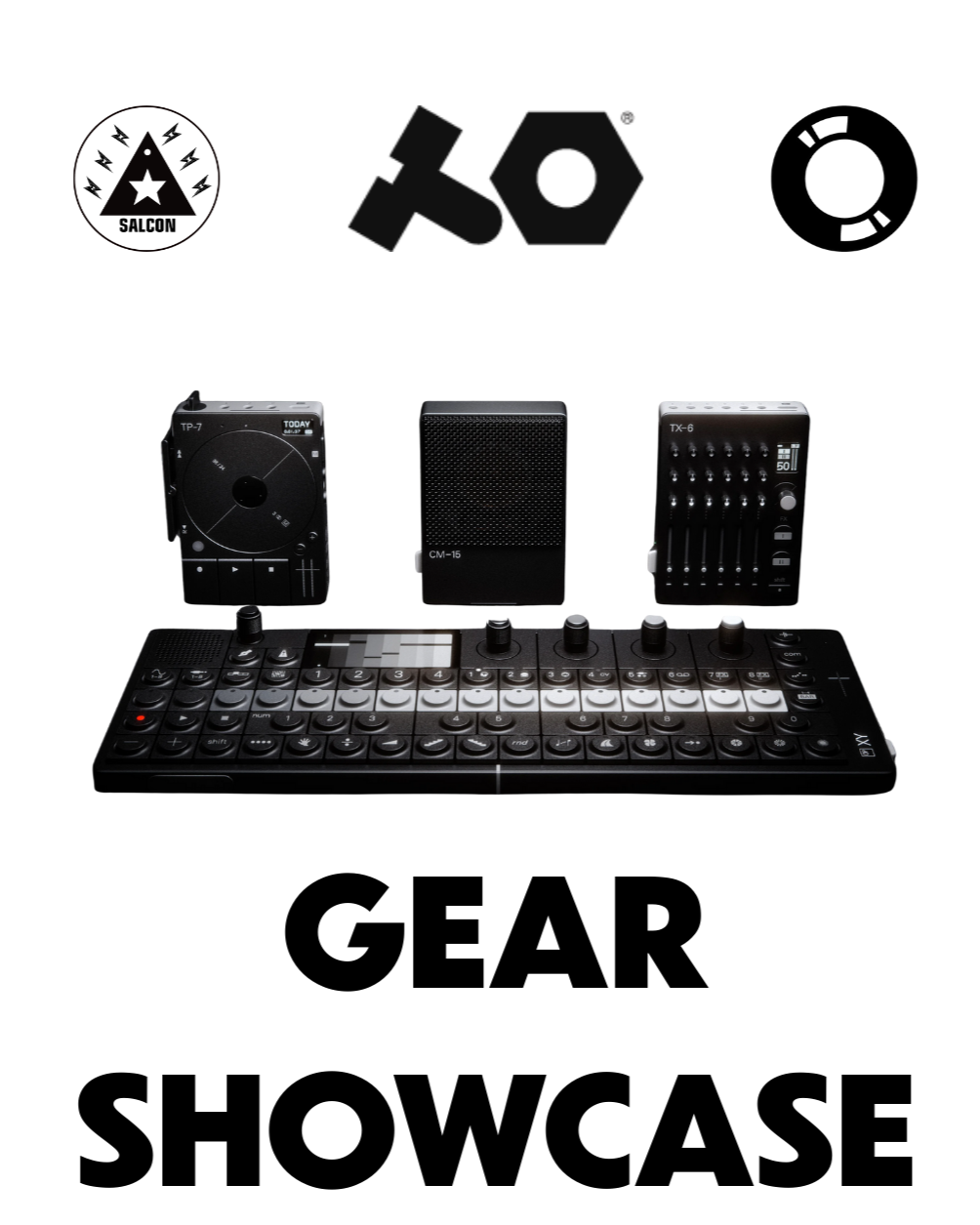
Regional Partner for Teenage Engineering. Sound system design at Salcon Electronics.
what they opened
A hands-on workshop on TE instruments, with sound shaped through process rather than presets. No prior experience needed.
Jeroen Verheij
Secret Cinema
Pioneering in electronic music since the early 1990s. Founder of Gem Records; mentor to Egbert, Enrico Sangiuliano and Reinier Zonneveld.
what they opened
Bitwig Studio workflow for production and live, and his evolution as producer, live act and label founder. Hosted by Shaun Moses.
Edgar de Ramon
TUTU Recordings
Spanish techno producer and DJ from the Ebro Delta, founder of TUTU. Worked with Matrixxman, Tensal, Arjun Vagale, Camea and Marco Faraone.
what they opened
Running a label, curating a sound and holding a long-term vision. The room could pitch tracks for a TUTU release.
Vridian
Vir Rattan Chowdhry
New Delhi. House, techno and breakbeat. Curates DON'T FEED THE ANIMALS. Releases on Qilla, Manjumasi, VOYCE Records and Amaylia. Live at Magnetic Fields and Echoes of Earth.
what they opened
Label strategy, promotion and industry navigation for independents, and how groove, structure and identity become a track.
Master Mario
Yury Yurasov
Turntablist and international touring DJ. Alfa Future People and Red Bull events.
what they opened
Two days: visual mapping and projection, then DJ mechanics, turntable control, mixer technique and booth workflow under pressure.
Oleg Espo
Producer and DJ across melodic techno, progressive house and indie dance. Releases on Spinnin', Armada and Soupherb, with support from Armin van Buuren and Above & Beyond.
what they opened
Developing an idea, structuring a track and getting a record released.
Rishii Rohra
Peach Blok
Producer and A&R at VOYCE Records. House, breaks and acid. Featured on Rolling Stone India, Worldwide FM, A Humming Heart and Wild City.
what they opened
Hands-on with the Elektron Digitone II, and a full track breakdown.
DJ Skipster
Rupesh Pant
The world's only triple title holder: IDA World Champion, DMC National Champion and Red Bull Freestyle National Champion. Sunburn, Vh1 Supersonic, Bacardi Weekender.
what they opened
Two evenings: a Rekordbox deep dive, then a live analogue synth jam and DJ set on the XDJ-AZ.
Pavi Lustig
@pavibes
Voice artist and sound designer.
what they opened
Voice acting, storytelling, sound design and building a voiceover career. The season finale.
to speak
Candidates reach out to VOYCE Academy at academy@voyce.world.
to attend
VOYCE Access members and Academy students are in. Everyone else registers online or on the ground.

FACULTY
Our faculty is a diverse group of working artists, producers and engineers who teach alongside their own practice.
For more information, write to us at academy@voyce.world or reach out through our contact page.
after the course
go further
the residency
Time in the building beyond the course: studio, Lab and the community, arranged per intake. Accommodation and transport are not included.
open dojo
The open practice room. Students and members work alongside each other, with faculty on hand.
under the hood
The Academy's series with the Lab: working artists open up a record, a set or a show, from the inside.
track consultation
One-to-one time on your own work with faculty, booked as a session.
cross-department work
Records, Films, the Lab and go360 are in the same building. Capstones travel.
academy showcases
Certified students can be programmed into VOYCE showcases and listening sessions.
Workshops run at the Academy every Saturday; dates are on Instagram. Certified students get 90 days of VOYCE Access.
enrolment
how to join
confirmed in writing before you enrol
- Start date and calendar duration
- Session length and schedule
- Payment terms
- Cancellation and rescheduling
- What certification requires
what we ask
- A laptop that runs the software
- Headphones you are used to
- The reference material a course asks for, by session two or three
- Turning up, and practice between sessions
Fees are per student and confirmed in writing at enrolment: academy@voyce.world.
The approved application, plug-in and licence list is frozen before each cohort, so assessed work stays reproducible.
start here
Enrol, or ask about a syllabus
Eighteen courses across production, performance and projection. Every course includes five studio hours in a VOYCE room on top of class time, and 90 days of VOYCE Access on certification.